How to Create Spec Sheets That Look Like Your Studio, Not a Tool
The short answer: build the spec as a project, then share it as a client link your client opens in their browser. Nothing to download, no account to create. You decide what each person sees before you send, so the selections go out clean while your suppliers and costs stay internal. It reads on a phone, updates in place and can carry your studio's branding. The rest of this is how to think about it, and where the old Excel-file way quietly costs you.

Table of contents
Share
The hard part is already done. You sourced the pieces, balanced the room, checked the lead times and got the numbers to work. The selections are good. So the moment they reach the client should feel like that too.
For most studios it doesn't. The spec goes out as an Excel file dropped into an email, or as a Google Sheet you share a link to. The client opens a wall of columns on their phone, scrolls sideways looking for the sofa, then somewhere in there spots your supplier names and the prices you paid. Good work, arriving in a way that undersells it and quietly hands over things they were never meant to see.
There's a cleaner way to do this. It doesn't involve a single attachment.
What goes wrong when a spec sheet reaches a client badly
Before the better way, it's worth being honest about the current one, because the failure isn't only cosmetic. The spreadsheet that runs your studio internally is the wrong object to hand a client, and it fails in three separate ways at once.
A client doesn't read a spreadsheet the way you do
You read a spec sheet by column. You know the third column is supplier, the seventh is your cost and the ninth is lead time, so your eye lands where it needs to. A client has none of that muscle memory. They open the file and see a grid. They don't know which numbers are decisions they're being asked to make and which are your working. So they do one of two things: they approve everything vaguely because pushing back feels like effort, or they freeze and the project stalls while they "have a look when they get a chance". Neither is the considered yes you actually wanted on the dining chairs.
It almost always opens on the wrong device
The client who commissioned the work is rarely at a desk when your email lands. They're on a phone, between things, curious. A spreadsheet on a phone is a sideways-scrolling grid with a sticky first column, and the experience tells them, before they've read a word, that this is admin. Good design selections shown as admin stop feeling like design. The format sets the mood, and the mood sets how generous they are with their approval.
The numbers in those cells were never meant to travel
This is the one that costs real money. The same sheet that holds your selections usually holds your supplier names, your trade prices and your margin. The moment it leaves your studio, that's all sitting in a client's inbox, forwardable to anyone, indefinitely. A client who can see the trade price on a sofa now has a number to push against at every future quote and a supplier name they can ring directly next time. You didn't decide to share that. The file did it for you.
How do I share a spec sheet with a client?
You build the spec as a project in thesheet, then share it as a client link. Your client opens it in their browser. Nothing to download, nothing to install, no account to create.
What the client actually opens
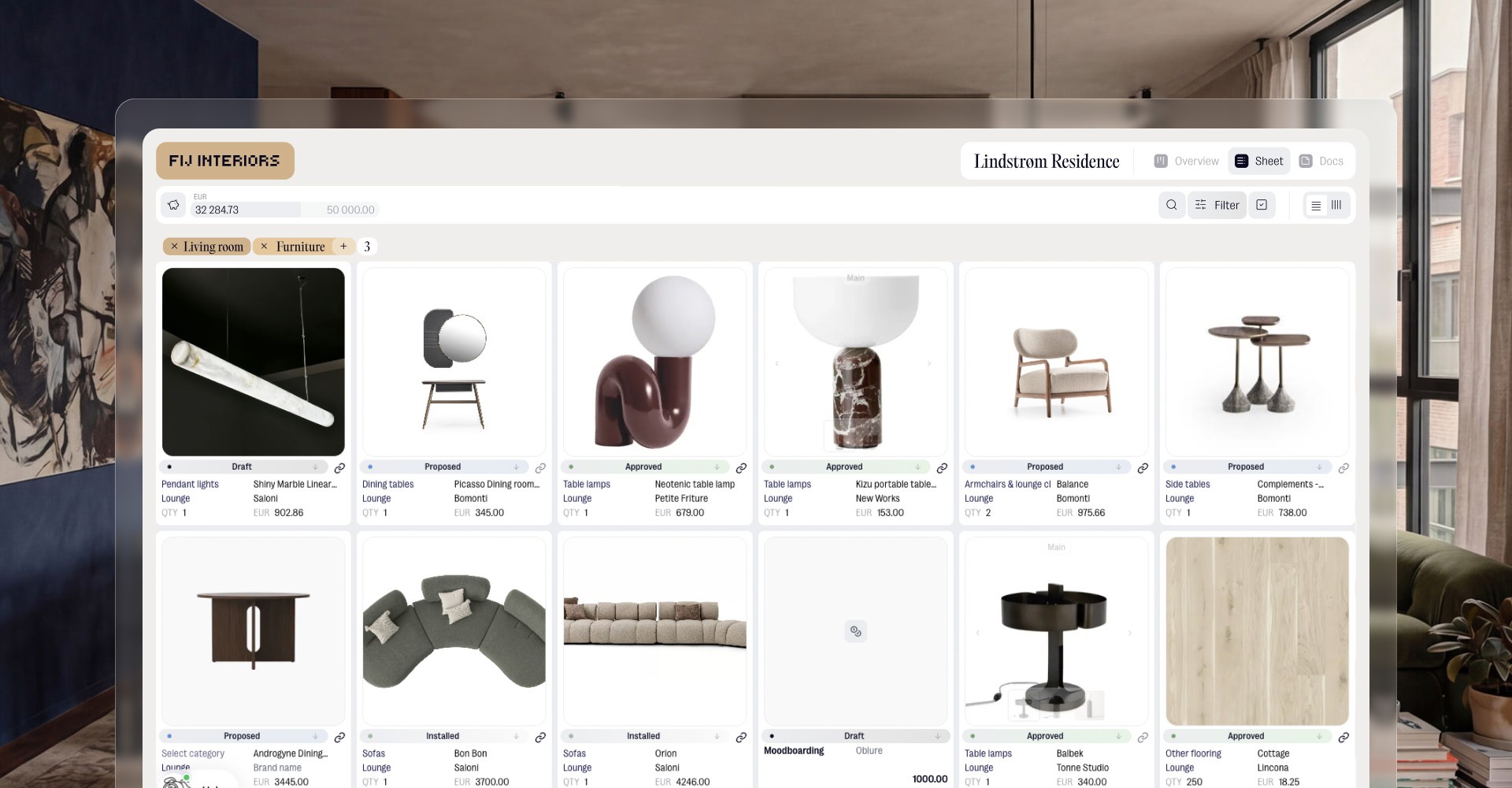
It reads properly on a phone, a tablet or a laptop, because it's a real page rather than a file someone has to wrestle into shape. The client sees the selections laid out the way you intended: the images, the rooms, the pieces, what they need to look at. It feels like looking at the work, not auditing a ledger. That shift in how it feels is most of the point.
Why "send the latest version" stops being a job
When you update the project, the link shows the latest version. There's no re-export, no re-attach, no "final_v3_REALLY_final" floating around three inboxes. Anyone who has the link is always looking at where the project actually is. If you swap a fabric on Tuesday, the client who opens the link on Wednesday sees Tuesday's choice, and you didn't have to do anything to make that true.
Why there's nothing for the client to figure out
No login, no app, no PDF reader, no pinch-to-zoom across forty columns. The barrier between your work and their yes is one tap. Every step you remove there is a step where the approval doesn't quietly die.
And because you decide what goes into that view before you send it, the link only ever shows what the client should see.
Can I hide my suppliers and prices from the client?
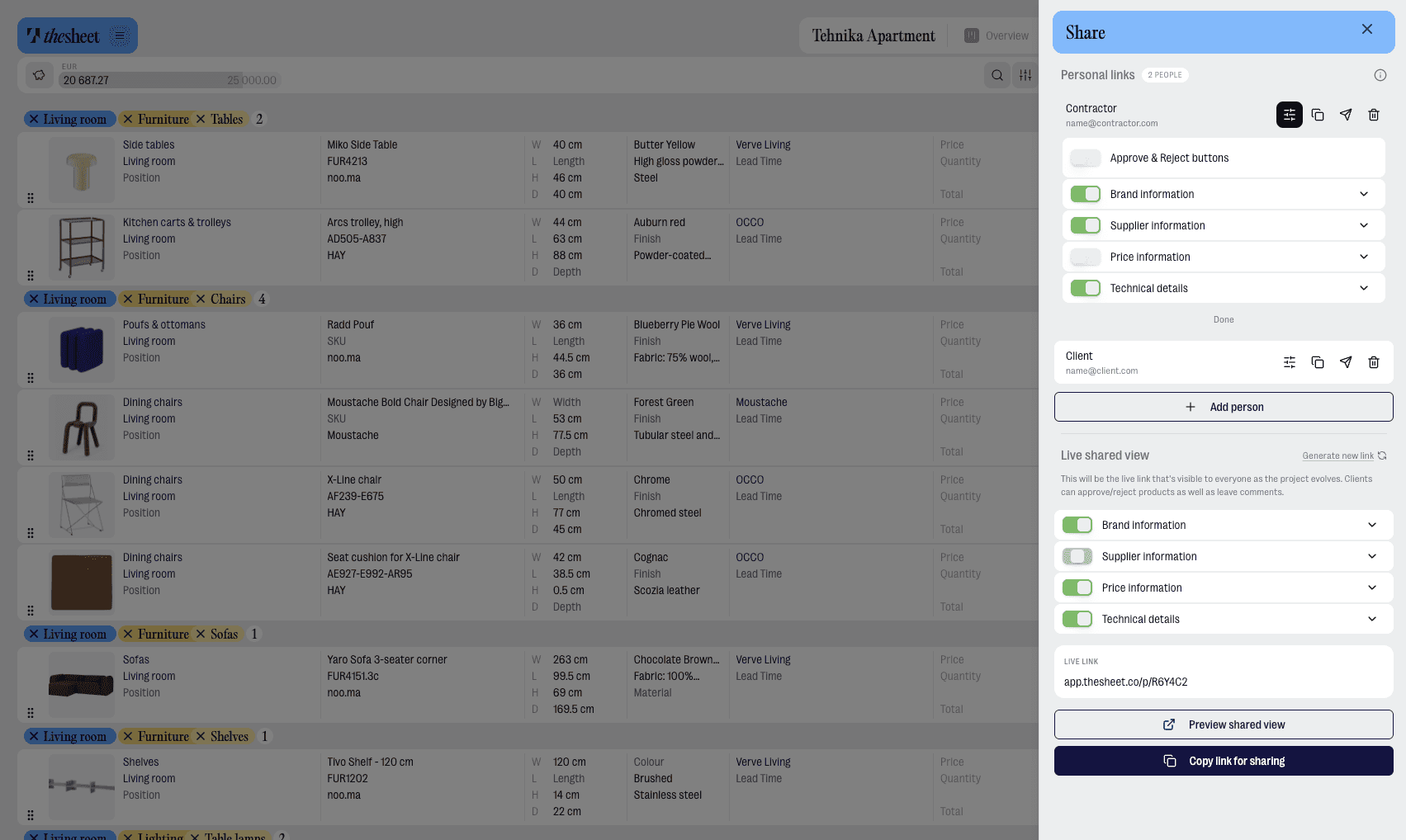
Yes. Before you share, you choose what each person can see. Supplier names, your costs and the heavier technical detail can stay internal, while the client gets the selections and the information they need to make a decision.
What the client should see
The pieces, the rooms, the look, the retail prices they're approving, the lead times that affect their plans. Enough to make a confident decision and feel looked after. Nothing that makes them feel they're reading your internal working.
What stays internal
Supplier names, trade costs, your margin, the rougher technical notes you keep for ordering. These run your business. They are not part of the decision you're asking the client to make, so they don't need to be in the client's view, and once you've set that up you can't accidentally leave them in.
Why the Excel "client copy" workaround breaks down
The usual fix is to keep a separate client copy of the spreadsheet with the sensitive columns deleted. It works right up until it doesn't. You forget to strip a column on a busy day. You update the master and forget to mirror it into the client copy, so the client is approving a stale selection. You email the wrong file. Every one of those is a manual step that depends on you remembering, every time, under pressure, forever. With a client link there's no second file to maintain. One project. One view you control, set once.
How do I send the same spec to a client and a contractor?
A client and a contractor are looking at the same room for different reasons, so they shouldn't get the same page. With personal links you give each person their own way in, tied to their email, off the same spec.
One spec, different views
The client opens a view with the pieces, the look and the prices they're approving. The contractor opens a view with the positions and the install detail they need on site. It's the same project underneath, so nothing can drift out of sync, but each person gets the version that's actually useful to them. You're not maintaining a "client deck" and a "site sheet" as two documents that slowly disagree.
Real names on every approval
When someone comments, approves or rejects a selection, their real name comes with it, in the view and in your notifications. You see that Maria approved the dining chairs and the contractor flagged a clearance issue on the island, instead of two messages from "Client" that you have to decode later. On a project with a couple, an assistant and a trade contact all looking at the same spec, knowing who said what is the difference between a clean record and a guessing game when something gets queried three weeks on.
How do I make the shared spec look like my studio?
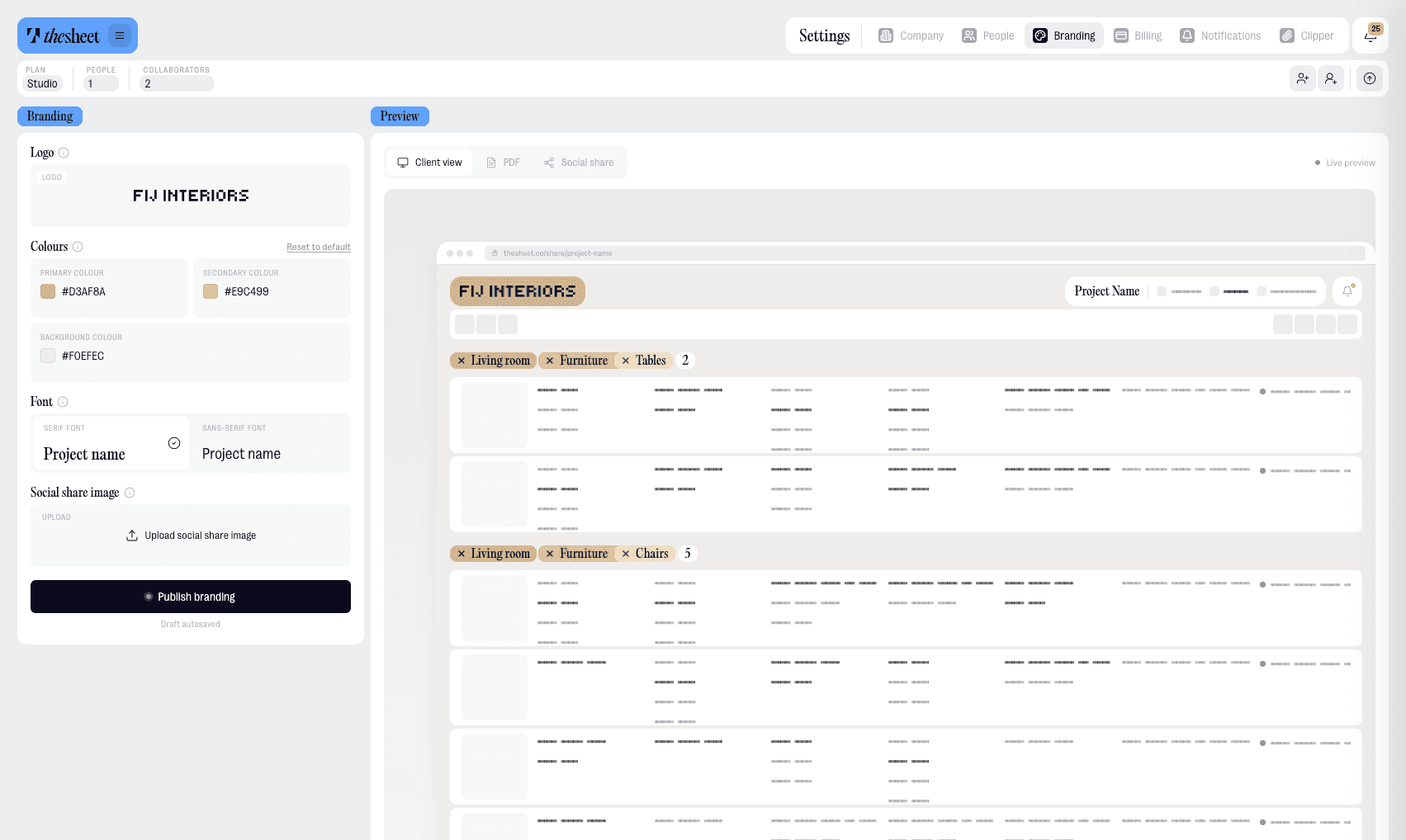
The work clients see should look like it came from your studio, not from a piece of software. With studio branding, your logo, colours and font carry through into the client link, so the page they open feels like yours.
What branding actually does to client confidence
It's a small thing that does a lot. A client deciding whether to sign off forty thousand pounds of furniture is also, quietly, deciding whether they trust the studio. A presentation that looks like your studio reads as "these people are established and this is handled". A generic grid reads as "this could be anyone". The selections were always good. Branding makes the wrapper match the standard of what's inside it, so the whole thing lands as one considered piece of work rather than a spreadsheet someone happened to share. That's not vanity. It's the thing that makes the approval feel safe.
Can I check what the client will see before I send it?
Yes, and it's worth doing every time. You can preview the client view before anything goes out, so you see exactly what lands in their browser: what's visible, what's hidden, how it reads on a smaller screen. Send it once you're happy with it, not before. The thirty seconds it takes is the cheapest insurance you'll buy against a supplier name reaching the one client who'd use it.
The old way vs a client link
Same spec, two ways of getting it in front of a client. This is the honest comparison against the workarounds most studios use now, not against any one tool.
How the client opens it
An Excel file needs a download, or a shared Google Sheet opens as a spreadsheet grid in the browser. A client link opens as a page in their browser. One tap, no login.
How it reads on a phone
The spreadsheet version means sideways scrolling, sticky columns and admin-looking cells. The client link reads as a real page.
What gets exposed
A spreadsheet can show every cell, including supplier names and your costs. A client link shows only what you choose to share.
Keeping versions straight
With a file, you re-export and re-send, then hope the client opens the latest one. With a client link, the link always shows the current project.
Who approved what
In email, approval can be a reply that says "looks good" from one inbox. In a client link, real names stay attached to each comment and approval.
How it looks
A spreadsheet looks like a spreadsheet. A client link carries your logo, colours and font.
The point is not that spreadsheets are bad. They are a fine place to think. They are just the wrong thing to hand a client. The comparison is really about separating the working file from the client-facing view.
The short version
If you only take one thing from this:
Build the spec as a project in thesheet, then share it as a client link instead of an Excel file or a shared sheet. The client opens it in the browser, with nothing to download.
You control what each person sees, so suppliers and your costs stay internal while the client sees the selections.
Personal links give a client and a contractor their own view of the same spec, with real names on every comment and approval.
Studio branding carries your logo, colours and font into the client link.
Preview the client view before you send.
Try it on a real project
Create a project, add your products and share the client link. The next spec you send can look like the work that went into it.
You can try thesheet for free .